← Back to Home
Trading Signal / Indicator
πŸ›οΈ

Donchian Channels

The breakout indicator behind the famous Turtle Trading system.

Start Automating Free β†’

Want to automate this strategy? Try auto-Trading free β€” no credit card required.

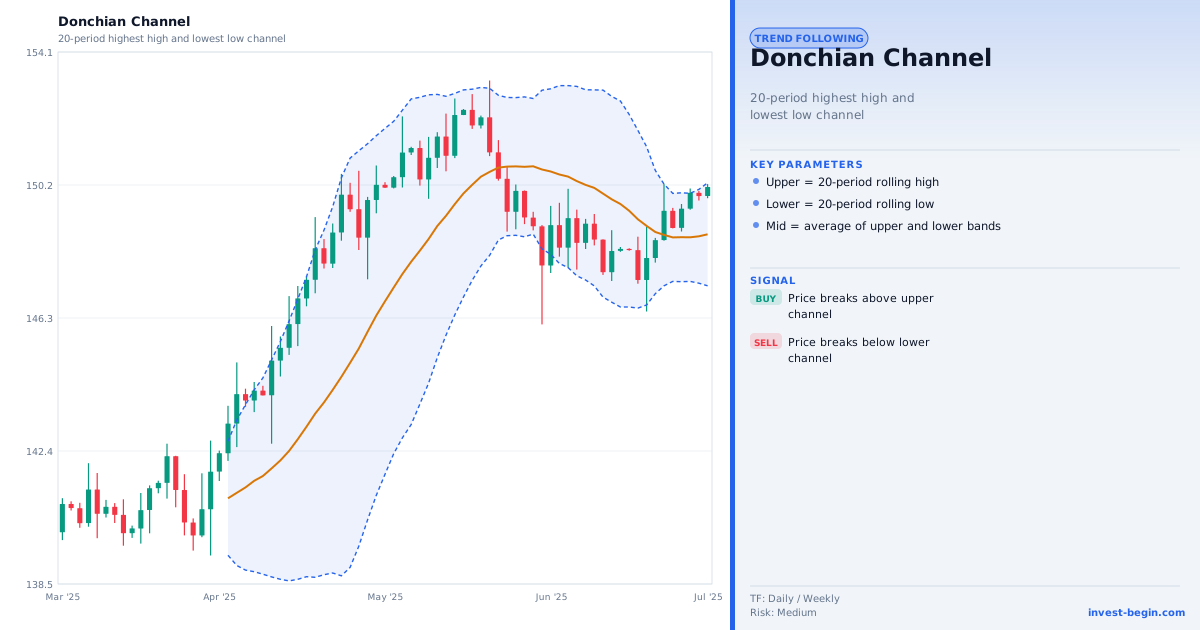
Donchian Channels chart

Overview

What is Donchian Channels?

Donchian Channels, developed by commodity trader Richard Donchian, plot the highest high and lowest low over a user-defined period as upper and lower bands, with a midline at the average. Price above the upper band signals a new N-period high (bullish breakout); price below the lower band signals a new N-period low (bearish breakout).

The indicator became famous as the core of the Turtle Trading System, where Richard Dennis used 20-day and 55-day Donchian channel breakouts as entry signals. The Turtle Traders, a group of novice traders trained by Dennis in 1983, famously became highly profitable by rigorously following these breakout rules β€” demonstrating that systematic, rules-based trading can succeed without intuition or experience.

A long entry is triggered when price closes above the 20-day upper band; a short when it closes below the lower band. Exits use the 10-day channel: a long is exited when price hits the 10-day lower band, and a short when it hits the 10-day upper band. Position sizing is ATR-based as described in the Turtle rulebook.

Donchian Channels are equally useful as a trend-following entry mechanism and as a support/resistance visualisation tool, with the midline acting as a dynamic mean.
How It Works in auto-Trading

Automate It

auto-Trading implements Donchian Channels with configurable period settings for entries (default 20) and exits (default 10), following the Turtle Trading specification. Users can also use a single-period Donchian for simplified breakout entries. The breakout signal integrates with the ATR-based position sizing module to fully implement the Turtle position-sizing formula.

Try Free β†’

Strategy Code

Pick a script below, copy it, and use it on your chart.

Pine Script (TradingView)

This is a TradingView Pine Script example for this indicator. Paste it into the TradingView Pine Editor, add it to your chart, and adjust inputs for your market and timeframe.

//@version=6
strategy("Donchian Channels", overlay=true)
len = input.int(20, "Breakout Length")
upper = ta.highest(high, len)
lower = ta.lowest(low, len)

Get full strategy code access

Enter your email address and full name to unlock this strategy code.

ThinkScript (thinkorswim)

This is a thinkorswim ThinkScript example for this indicator. Open thinkorswim, create a custom study, paste the script, and apply it to your chart.

input length = 20;
def upper = Highest(high, length);
def lower = Lowest(low, length);
def buySignal = close > upper[1];
def sellSignal = close < lower[1];

Get full strategy code access

Enter your email address and full name to unlock this strategy code.

Ready to automate Donchian Channels?

Join thousands of traders who use auto-Trading to execute this strategy automatically, 24/7.

Get Started Free β†’

All Strategies & Signals

Continue Learning

Trading Strategies

Trading Signals & Indicators