← Back to Home
Trading Signal / Indicator
🌊

Keltner Channels

Volatility-based envelopes built on ATR to identify trend strength and breakouts.

Start Automating Free →

Want to automate this strategy? Try auto-Trading free — no credit card required.

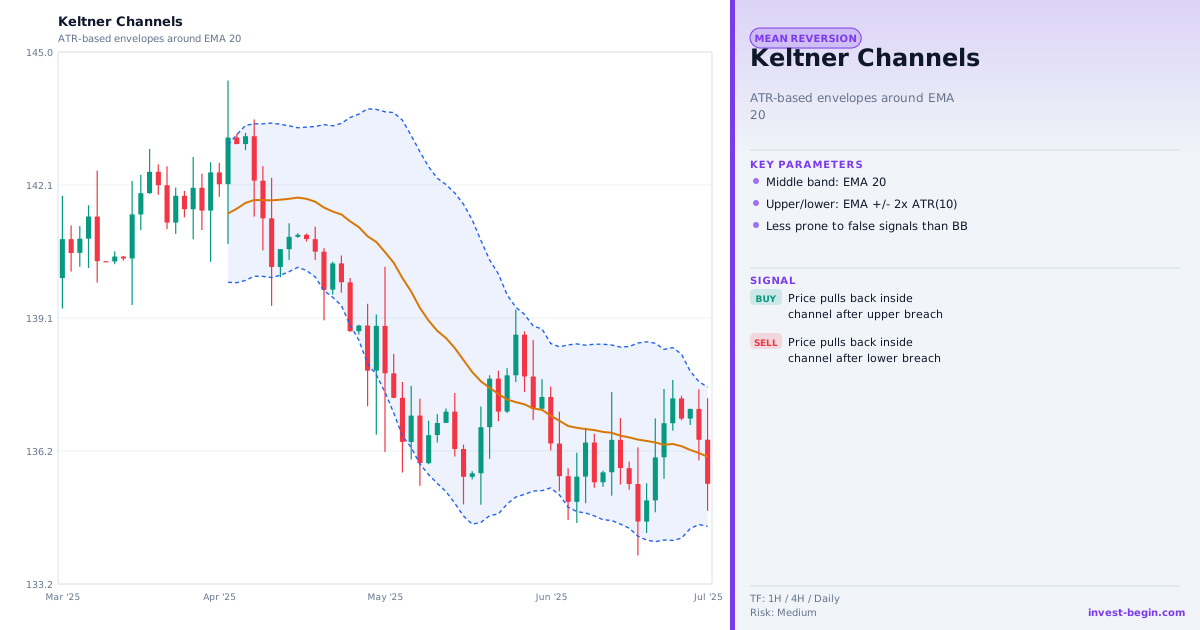
Keltner Channels chart

Overview

What is Keltner Channels?

Keltner Channels were originally developed by Chester Keltner in the 1960s and later modernized by Linda Bradford Raschke, who replaced Keltner's original construction with an EMA center-line and ATR-based bands — the version used today. The indicator places an upper and lower band at a multiple of the Average True Range above and below an Exponential Moving Average.

Unlike Bollinger Bands (which use standard deviation), Keltner Channels use ATR — a measure of true range volatility — which makes the bands smoother and less prone to sudden expansions during brief price spikes. This smoothness makes them useful for identifying sustained trend moves rather than just momentary volatility events.

When price consistently closes above the upper band, it signals a strong uptrend — bearish signals within that context should be ignored. When price closes below the lower band, a strong downtrend is in place. The center EMA acts as a dynamic support/resistance line and a mean-reversion target.

One of the most popular strategies is the "Keltner-Bollinger Squeeze": when Bollinger Bands contract inside the Keltner Channel, it identifies an extreme volatility compression that often precedes an explosive directional move. Traders wait for bands to expand and price to break out to determine direction.

How It Works in auto-Trading

Automate It

auto-Trading implements Keltner Channels with configurable EMA period and ATR multiplier. Built-in squeeze detection alerts you when Bollinger Bands compress inside the Keltner Channel. Strategy triggers include upper/lower band touches, EMA crossovers, and momentum-confirmed breakouts.

Try Free →

Strategy Code

Pick a script below, copy it, and use it on your chart.

Pine Script (TradingView)

This is a TradingView Pine Script example for this indicator. Paste it into the TradingView Pine Editor, add it to your chart, and adjust inputs for your market and timeframe.

//@version=6
strategy("Keltner Channels", overlay=true)
fastLen = input.int(20, "Fast Length")
slowLen = input.int(50, "Slow Length")
fast = ta.ema(close, fastLen)

Get full strategy code access

Enter your email address and full name to unlock this strategy code.

ThinkScript (thinkorswim)

This is a thinkorswim ThinkScript example for this indicator. Open thinkorswim, create a custom study, paste the script, and apply it to your chart.

input length = 20;
input atrMult = 1.5;
def mid = ExpAverage(close, length);
def atrVal = ATR(length);
def upper = mid + atrMult * atrVal;

Get full strategy code access

Enter your email address and full name to unlock this strategy code.

Ready to automate Keltner Channels?

Join thousands of traders who use auto-Trading to execute this strategy automatically, 24/7.

Get Started Free →

All Strategies & Signals

Continue Learning

Trading Strategies

Trading Signals & Indicators