← Back to Home
Trading Strategy
βš–οΈ

Supply & Demand Zones

Trade institutional order imbalances where price reversal probability is highest.

Start Automating Free β†’

Want to automate this strategy? Try auto-Trading free β€” no credit card required.

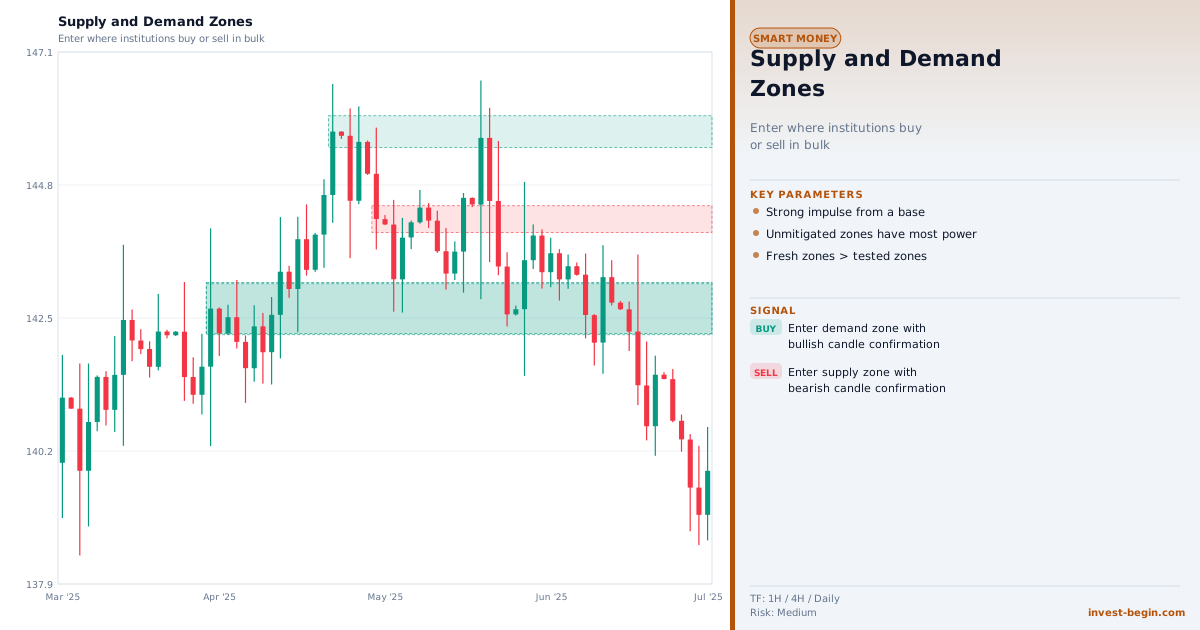
Supply & Demand Zones chart

Overview

What is Supply & Demand Zones?

Supply and Demand Zone trading is one of the most robust forms of technical analysis because it is rooted in basic economics: price moves when there is an imbalance between buyers and sellers. A Demand Zone is a price area where buying orders overwhelmed selling orders so intensely that price left rapidly β€” these unfilled buy orders are theorized to remain in the market, creating a high-probability bounce area when price returns.

Supply Zones are the inverse: areas where massive selling pressure overwhelmed buyers, causing a sharp drop. The visual signature of a strong zone is a "basing" candle (or candles) followed by an explosive directional move. The stronger and faster the original move away from the zone, the more significant the unfilled orders, and the higher the probability of a reaction when price revisits.

The strategy's edge comes from its asymmetric risk/reward: entries are placed at the near edge of the zone with stops just beyond the far edge, targeting at least 2:1 or 3:1 reward. A zone is considered "used up" and weakened after multiple retests, as the original orders are progressively filled.

Supply and Demand analysis closely overlaps with Smart Money Concepts β€” both look for areas of institutional activity. The key difference is that S&D purists focus on the visual imbalance pattern, while SMC practitioners incorporate additional concepts like order blocks, liquidity, and market structure.

How It Works in auto-Trading

Automate It

auto-Trading identifies Supply and Demand zones automatically by scanning for basing patterns followed by impulse moves exceeding a configurable threshold. Zones are ranked by freshness, strength, and distance from current price. Automated strategies execute limit orders at zone proximal levels with stop-losses defined by the distal edge.

Try Free β†’

Strategy Code

Pick a script below, copy it, and use it on your chart.

Pine Script (TradingView)

This is a TradingView Pine Script strategy example for this page concept. Paste it into the TradingView Pine Editor, add it to your chart, and run it in the Strategy Tester.

//@version=6
strategy("Supply & Demand Zones", overlay=true)
emaFast = ta.ema(close, 20)
emaSlow = ta.ema(close, 50)
bullStructure = close > emaFast and emaFast > emaSlow

Get full strategy code access

Enter your email address and full name to unlock this strategy code.

ThinkScript (thinkorswim)

This is a thinkorswim ThinkScript strategy example for this page concept. Open thinkorswim, create a custom strategy, paste the script, and apply it to your chart.

def fast = ExpAverage(close, 20);
def slow = ExpAverage(close, 50);
def liquidityGrab = low < Lowest(low, 10)[1] and close > open;
def buySignal = close > fast and fast > slow and liquidityGrab;
def sellSignal = close < fast;

Get full strategy code access

Enter your email address and full name to unlock this strategy code.

Ready to automate Supply & Demand Zones?

Join thousands of traders who use auto-Trading to execute this strategy automatically, 24/7.

Get Started Free β†’

All Strategies & Signals

Continue Learning

Trading Strategies

Trading Signals & Indicators